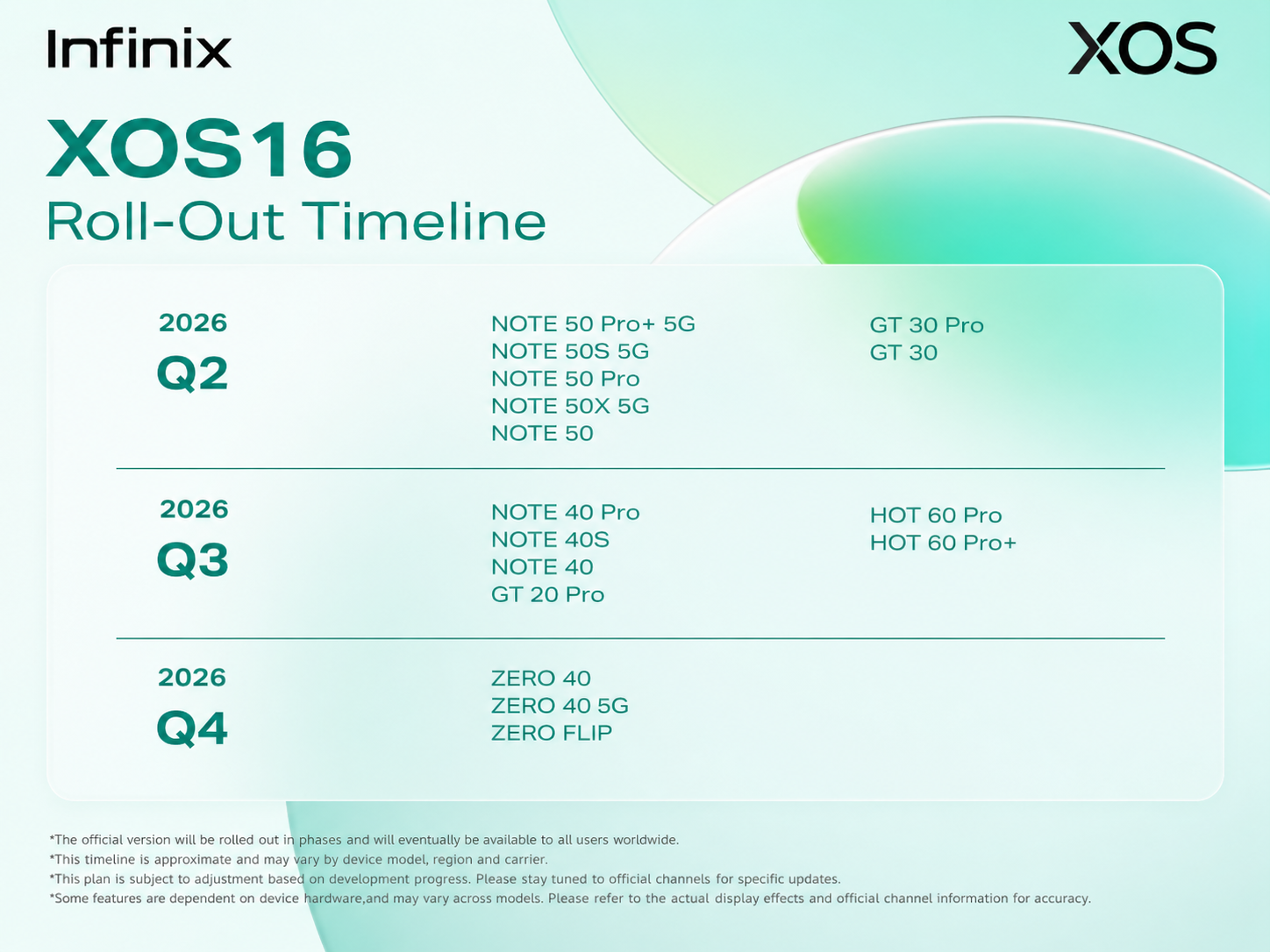
Infinix has officially revealed the XOS 16 roll-out timeline, bringing exciting news for users waiting for the latest software experience on their smartphones. The update will be released in phases across selected devices from Q2 2026 onwards.
But before checking the eligible models, let’s understand what XOS actually is and why it matters for Infinix users.
What is Infinix XOS?
XOS is the official custom operating system developed by Infinix for its smartphones. It is built on top of Android and is designed to provide a smarter, smoother, and more personalized mobile experience.
XOS adds extra features, visual enhancements, AI tools, security options, gaming optimizations, and customization settings that go beyond standard Android.
With every major update, XOS aims to improve:
- Phone performance
- Battery optimization
- User interface design
- Privacy & security
- Gaming experience
- Multitasking
- Smart AI features
The upcoming XOS 16 update is expected to deliver a cleaner UI, smoother animations, better app management, improved battery efficiency, and enhanced overall system stability.
Infinix XOS 16 Roll-Out Timeline
2026 Q2 Devices
The following devices are expected to receive the XOS 16 update in Q2 2026:
NOTE Series
- NOTE 50 Pro+ 5G
- NOTE 50S 5G
- NOTE 50 Pro
- NOTE 50X 5G
- NOTE 50
GT Series
- GT 30 Pro
- GT 30
2026 Q3 Devices
These devices are expected to receive the update during Q3 2026:
NOTE Series
- NOTE 40 Pro
- NOTE 40S
- NOTE 40
GT Series
- GT 20 Pro
HOT Series
- HOT 60 Pro
- HOT 60 Pro+
2026 Q4 Devices
The following ZERO series smartphones are expected to receive the update in Q4 2026:
ZERO Series
- ZERO 40
- ZERO 40 5G
- ZERO FLIP
Expected Features of XOS 16
While feature availability may vary by device, users can expect improvements such as:
- Smoother UI animations
- Better RAM and storage management
- Enhanced battery optimization
- Improved gaming performance
- New customization options
- Updated privacy and security settings
- Faster app opening speed
- Smarter AI-powered tools
- Cleaner notification and control center experience
How to Check for the XOS 16 Update
To check whether the update is available on your device:
Settings > System > Software Update
Make sure your phone:
- Has sufficient battery
- Is connected to stable Wi-Fi
- Has enough storage space before updating
Important Information
The XOS 16 update will roll out gradually in different regions and may vary depending on:
- Device model
- Country/region
- Carrier version
- Software testing progress
Some features may also differ across devices based on hardware compatibility.
Final Thoughts
The XOS 16 update is expected to bring a faster, smarter, and more refined smartphone experience for Infinix users. If your device is listed in the roll-out schedule, keep checking for updates regularly and stay connected with official Infinix channels for the latest announcements.