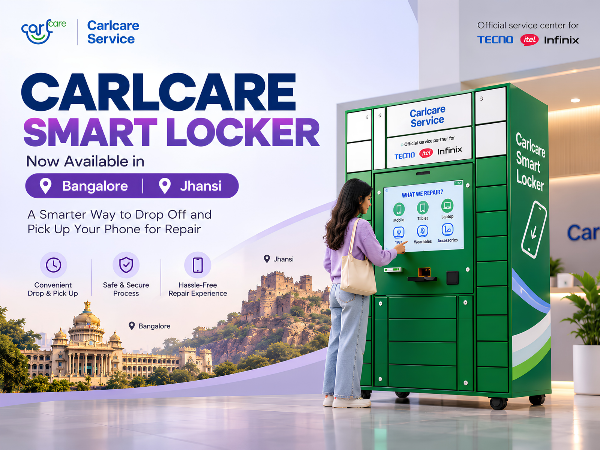
Getting your smartphone repaired shouldn't always mean waiting in a queue or adjusting your entire day around a service-centre visit. To make the repair experience more convenient and flexible, Carlcare Smart Locker is now launched in Bangalore and Jhansi.
The Carlcare Smart Locker provides a digitally guided way to deposit your smartphone for repair and collect it after the repair is completed. Carlcare describes its Smart Locker service as part of its effort to reduce queuing and waiting time and provide customers with a more flexible repair experience.
For TECNO, Infinix and itel users, here's everything you should know about using the Carlcare Smart Locker, including the deposit process, pickup process, benefits, and important do's and don'ts.
What Is a Carlcare Smart Locker?
A Carlcare Smart Locker is a self-service device drop-off and collection facility designed to simplify the smartphone repair journey.
Instead of following only the conventional device handover process, customers can use the Smart Locker's digital interface to enter their details, select their device and repair information, and securely place the smartphone inside an assigned compartment.
A Carlcare staff member then collects the deposited device for the applicable repair process.
Once the repair is completed and the device is ready for collection, the customer receives a pickup code via SMS and can retrieve the repaired smartphone from the Smart Locker.
Carlcare says Smart Lockers are intended to give customers a more convenient and flexible way to access professional repair services while reducing unnecessary waiting.
Where Is Carlcare Smart Locker Available in India?
The Carlcare Smart Locker service has been launched in Bangalore and Jhansi.
Customers in these locations can use the available Smart Locker facility for eligible device repair drop-off and collection.
Availability and operating conditions can vary by location, so customers can contact Carlcare before visiting if they need confirmation or assistance.
📞 Carlcare Toll-Free: 1800-4190-525
💬 WhatsApp: +91 99991 35666
Carlcare's official India website confirms these customer-support channels.
How to Deposit Your Phone in a Carlcare Smart Locker
Using the Smart Locker is designed to be straightforward. Follow the instructions displayed on the screen carefully.
Step 1: Tap “Deposit for Repair”
Start at the Smart Locker screen and select:
“Deposit for Repair”
This begins the device-deposit process.
Step 2: Enter Your Active Mobile Number
Enter your phone number.
Make sure the number is correct, active and reachable, because important repair and collection information may be communicated through it.
Double-check the number before proceeding.
Step 3: Select Your Phone Model
Select the correct smartphone model from the options displayed on the screen.
Do not choose a similar-looking or different model simply to proceed faster. Correct device information helps ensure that your repair request is recorded accurately.
Step 4: Choose the Correct Compartment Size
Select an appropriate locker compartment according to the size of your smartphone.
Your device should fit comfortably inside the assigned compartment.
Step 5: Select the Fault Type
Select the problem you're experiencing with the device.
Depending on the available options, this could relate to issues such as:
- Display or touchscreen
- Battery
- Charging
- Camera
- Speaker or microphone
- Software
- Other hardware problems
Choose the option that most closely matches your actual issue.
Step 6: Read the Repair Service Agreement
Before depositing your phone, carefully read the Repair Service Agreement displayed during the process.
Don't skip through this section without understanding the applicable service conditions.
Step 7: Place Your Phone Inside the Locker
The system will assign a locker compartment.
Carefully place your smartphone inside and make sure the device is completely inside the compartment.
Close the locker door securely.
Then select:
“Confirm Door Close.”
Before confirming, make sure the locker is properly closed.
Step 8: Keep Your Printed Deposit Record
After a successful deposit, the Smart Locker will provide printed repair information.
Take the printed copy with you.
Do not leave it behind or throw it away. Keep it safely until your repair and collection process is complete.
Step 9: Carlcare Staff Collects the Device
After the deposit is completed, a Carlcare staff member collects the smartphone from the Smart Locker so that it can proceed through the applicable repair process.
Carlcare is the official customer-service provider for TECNO, Infinix and itel in India.
How to Collect Your Phone After Repair
The Smart Locker is also designed to simplify device collection.
Once the repair is completed and your phone is ready, follow these steps.
Step 1: Wait for Your Pickup Code
After your device has been repaired and is ready for collection, you will receive a 6-digit pickup code via SMS.
Keep this code private.
Step 2: Select “Retrieve After Repair”
Return to the Smart Locker and select:
“Retrieve After Repair”
Step 3: Enter the 6-Digit Pickup Code
Enter the pickup code you received via SMS.
Check that you've entered all six digits correctly and then tap “Enter” to proceed.
Step 4: Collect Your Device
If no payment is required at that stage, the relevant locker compartment will open automatically.
Carefully collect your smartphone.
Before leaving, make sure:
You have collected your device.
You haven't left anything inside the compartment.
The locker door has been properly closed after collection.
What If You Don't Receive the Pickup Code?
If you've been informed that your repair is completed but haven't received the pickup code, don't keep entering random codes or repeatedly attempt to open the locker.
Contact Carlcare for assistance.
📞 Toll-Free: 1800-4190-525
💬 WhatsApp: +91 99991 35666
You can also contact Carlcare through its official customer-support channels.
Do's When Using Carlcare Smart Locker
A few simple checks can make the entire Smart Locker experience smoother.
DO Enter the Correct Mobile Number
Your registered number is important for repair communication and collection information.
Always verify the number before submitting your request.
DO Select the Correct Device Model
Make sure the model shown on the screen matches the phone you're depositing.
DO Select the Correct Fault
Provide accurate information about the issue you're experiencing.
The more accurate your repair information is, the easier it is for the service team to understand your complaint.
DO Choose the Right Compartment
Select a locker size appropriate for your smartphone.
Never force a phone into a compartment that is too small.
DO Read the Repair Service Agreement
Review the applicable service conditions before confirming the deposit.
DO Close the Locker Properly
After placing the device inside, make sure the compartment door is completely closed before selecting “Confirm Door Close.”
DO Keep Your Printed Receipt
Your printed deposit information is an important record of the submission.
Keep it until your phone has been successfully repaired and collected.
DO Back Up Important Data
Before submitting your smartphone for repair, back up important:
- Photos
- Videos
- Contacts
- Documents
- Chats and other essential information
Device storage may sometimes need to be deleted or reformatted during certain repair procedures, so maintaining a backup is a sensible precaution.
DO Check for a Finance Lock Before Repair
If your smartphone has an active finance/EMI-related device lock, check and resolve any applicable restrictions before submitting the device if they could prevent diagnosis or repair.
This can help avoid unnecessary delays in the repair process.
DO Keep Your Pickup Code Private
Treat your pickup code like a password.
It is intended for collecting your repaired smartphone, so don't casually share it with other people.
Don'ts When Using Carlcare Smart Locker
Knowing what not to do is just as important.
DON'T Enter an Incorrect or Inactive Number
An incorrect mobile number can interfere with repair communication and the pickup process.
DON'T Lose Your Printed Deposit Record
Keep the printed copy somewhere safe until the complete repair journey is finished.
DON'T Share Your Pickup Code
Do not post, forward or casually share your 6-digit pickup code.
DON'T Force the Locker Door
If a compartment does not open or close correctly, don't pull, push or force it.
Contact Carlcare staff or customer support for assistance.
DON'T Put Undeclared Devices or Items Inside
Only deposit the device associated with your repair request.
Do not put another phone, accessory or undeclared item inside the locker unless the repair instructions specifically require it.
DON'T Leave Your SIM or Memory Card Without Checking
Unless they are specifically required for diagnosis, check whether your SIM card, microSD card or other removable accessories need to be removed before depositing the device.
DON'T Leave Without Confirming the Deposit
After closing the compartment, complete the on-screen confirmation and make sure the deposit has been successfully recorded.
DON'T Forget to Collect the Printed Information
Once your deposit is successful, take the printed copy with you.
Smart Locker Do's & Don'ts at a Glance
|
DO |
DON'T |
|
Enter an active and correct mobile number |
Enter an incorrect or unreachable number |
|
Select the correct phone model |
Choose a different model |
|
Select the correct fault |
Provide incorrect repair information |
|
Choose the appropriate locker size |
Force the phone into a small compartment |
|
Read the Repair Service Agreement |
Skip important service information |
|
Close the locker securely |
Force the locker door |
|
Keep your printed deposit record |
Lose or discard your receipt |
|
Back up important data |
Submit important data without a backup |
|
Check applicable finance-lock restrictions |
Ignore a lock that could affect repair |
|
Keep the pickup code private |
Share your pickup code |
|
Deposit only declared items |
Leave undeclared devices or items inside |
Why Use a Carlcare Smart Locker?
The biggest advantage is flexibility.
Traditional smartphone repair can involve waiting for device handover and collection. Smart Lockers provide another service option designed to make those stages more convenient.
Carlcare says its Smart Locker model integrates digital technology with its professional repair capabilities to help reduce queuing and waiting time.
Simple Digital Process
The screen guides you through the steps required to deposit and retrieve your smartphone.
Secure Device Deposit
Your smartphone is placed inside an assigned locker compartment rather than simply being left unattended.
Code-Based Collection
Once the repaired phone is ready, the pickup process uses the code sent to your registered mobile number.
Less Waiting
The Smart Locker is designed to reduce the time spent on the physical device handover and collection process.
Official Repair Support
Devices submitted through the applicable Carlcare process receive support through Carlcare's after-sales service network. Carlcare identifies itself as the official customer-service provider for TECNO, Infinix and itel in India.
Carlcare Smart Locker Is Now in Bangalore and Jhansi
For customers in Bangalore and Jhansi, smartphone repair now has a smarter service option.
The launch of the Carlcare Smart Locker in Bangalore and Jhansi brings a digitally guided device deposit and collection experience to customers in these cities.
The idea is simple:
Deposit → Repair → Receive Pickup Code → Collect
Follow the on-screen instructions carefully, provide the correct information, keep your printed deposit record and never share your pickup code.
For assistance with Smart Locker use or your TECNO, Infinix or itel smartphone repair, contact Carlcare:
📞 Carlcare Toll-Free: 1800-4190-525
💬 WhatsApp: +91 99991 35666
📍 Find a Carlcare Service Center
Smart Locker services, eligible devices, repair conditions, payment requirements and operating availability may vary by location. Follow the instructions displayed on the Smart Locker and applicable Carlcare service terms.