Why Does My Phone Have 3 or 4 Cameras?
If you flip your smartphone over, you might see two, three, or even four camera lenses staring back at you. It’s a design trend that has taken over the tech world, from premium flagships like the TECNO Phantom V Fold to budget-friendly beasts like the Infinix Hot series.
But have you ever wondered why? Why can’t one really good camera do the job?
The answer lies in simple physics—and a bit of digital magic. Here is the breakdown of what each of those "eyes" actually does.
The Problem: Phones Are Thin, Cameras Are Fat
Traditional cameras (DSLRs) use massive zoom lenses that physically extend and retract to zoom in. But smartphones are designed to be ultra-slim. You can’t fit a giant, extending zoom lens inside a phone that is only 8mm thick.
The Solution: Instead of one lens that does everything, engineers split the job into multiple specialized lenses. It’s like carrying a golf bag: you have a driver for long shots, an iron for the fairway, and a putter for the green.
Meet the Team: What Each Lens Does
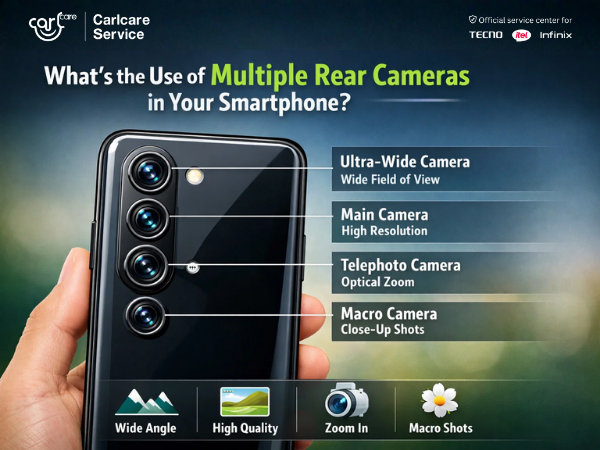
1. The "Main" Camera (Wide Lens)
-
The Job: This is your everyday shooter. It usually has the highest megapixel count (50MP, 64MP, or 108MP) and the best sensor for low light.
-
When to use it: 90% of your photos—street shots, food pics, and general memories.
2. The Ultra-Wide Lens
-
The Job: This lens zooms out significantly (usually 0.5x). It creates a "fisheye" effect at the edges but captures a much wider field of view.
-
When to use it: Massive landscapes, tall buildings, or fitting a large group of 20 friends into a single frame without stepping back.
3. The Telephoto Lens (The Zoom King)
-
The Job: This lens is designed to see far away. Unlike "digital zoom" (which just crops and blurs your image), a telephoto lens uses Optical Zoom (2x, 3x, or 5x) to magnify the image physically.
-
When to use it: Capturing a bird in a tree, a concert stage from the back row, or a portrait where you want the background to look compressed and professional.
4. The Macro Lens
-
The Job: This lens acts like a microscope. It allows you to focus on objects that are just 2-4cm away from the camera.
-
When to use it: Photographing the texture of a flower petal, an insect, or the details on a coin.
5. The Depth Sensor (The Invisible Helper)
-
The Job: This isn't really a camera you take photos with. It measures distance. It tells the phone, "The person is 2 meters away, but the tree is 10 meters away."
-
When to use it: It powers Portrait Mode, allowing the phone to blur the background (Bokeh effect) accurately while keeping your face sharp.
The Magic: They Work Together
When you pinch to zoom on your screen, you aren't just cropping; your phone is seamlessly switching from the Main lens to the Telephoto lens. When you take a Night Mode shot, multiple cameras might fire at once to gather more light and detail, stitching them together into one perfect image.
Cracked a Lens? It’s More Serious Than You Think.
With 3 or 4 glass lenses on the back, the risk of a crack is higher than ever.
-
The Risk: A crack over just one lens can ruin the entire camera system. It lets dust and moisture inside, which can fog up all the cameras internally.
-
The Calibration Issue: You can't just glue a new glass on. Modern multi-camera systems need precise calibration to ensure they switch seamlessly.
The Carlcare Fix: As the Official Service Provider for TECNO, Infinix, and itel, we don't just replace glass.
-
Genuine Camera Modules: We replace damaged units with factory-original parts.
-
Professional Calibration: We use specialized tools to align the cameras so your focus remains razor-sharp.
-
IP Protection: We ensure your phone is sealed correctly to keep dust out.
Keep your "Spider Eyes" sharp and clear. If you spot a crack, book a repair today!
📞 FOR BOOKING, CALL US NOW: 1800-4190-525.
Find a Service Center - https://www.carlcare.in/in/service-center/
Book a Repair Appointment - https://www.carlcare.in/in/repair-appointment/