Why Checking Your Phone Warranty is Important
Before visiting a service center, it is always a good idea to check your phone’s warranty status.
Benefits of checking warranty include:
-
Knowing if your repair will be covered under warranty
-
Avoiding unexpected repair costs
-
Getting free repairs or parts replacement if the issue is covered
-
Faster service at authorized Carlcare Service Centers
Carlcare makes this process simple and convenient for all users in India.
How to Check Warranty on the Carlcare Website
You can easily check your Infinix, TECNO, or itel warranty online through the Carlcare website.
Follow these steps:
-
Visit the Carlcare India official website
-
Navigate to the Warranty Check section
-
Enter your IMEI number
-
Click Check Warranty
Your device warranty details will instantly appear on the screen, including the warranty start date and expiry date.
How to Find Your IMEI Number
You can find your phone’s IMEI number by:
-
Dialing *#06# on your phone
-
Checking the phone box or invoice
-
Going to Settings > About Phone
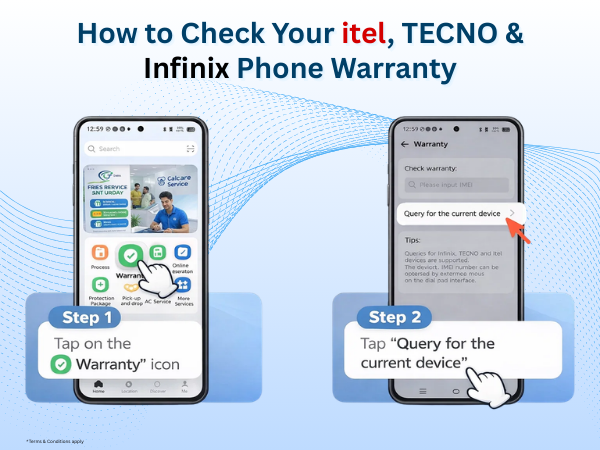
How to Check Warranty Using the Carlcare App
Another convenient way to check your device warranty is through the Carlcare mobile app.
The Carlcare app is designed to help users manage after-sales services easily, including repairs, warranty checks, and service tracking.
Steps to check the warranty in the Carlcare App
-
Download or open the Carlcare App
-
Register or log in to your account
-
Tap on Warranty Check
-
Enter your IMEI number
-
View your device warranty status instantly
The app also allows users to book repairs, track service progress, and find nearby service centers.
What to Do If Your Phone Is Under Warranty
If your Infinix, TECNO, or itel device is still under warranty, you can visit a Carlcare authorized service center for support.
Carlcare technicians will inspect your device and repair eligible issues under warranty according to the company policy.
Make sure to carry:
-
Your device
-
Purchase invoice
-
Warranty information
What If Your Warranty Has Expired?
If your warranty has expired, Carlcare still offers reliable and affordable repair services.
At Carlcare Service Centers, you will get:
-
Professional technicians
-
Genuine spare parts
-
Trusted repair service
This ensures your itel, TECNO, or Infinix smartphone performs like new again.
Why Choose Carlcare India?
Carlcare is the official after-sales service provider in India for Infinix, TECNO, and itel smartphones.
With Carlcare, you get:
✔ Authorized repair service
✔ Genuine parts
✔ Expert technicians
✔ Transparent service process
You can also access multiple services through the Carlcare website and mobile app, making after-sales support easier than ever.
Final Words
Checking your Infinix, TECNO, or itel warranty status is quick and simple using the Carlcare website or Carlcare app. It helps you understand your repair eligibility and ensures you receive official support from authorized service professionals.
Before visiting a service center, take a moment to check your warranty online and save time.
Need assistance with your device?
Toll-free - 1800-4190-525
Find a Service Center - https://www.carlcare.in/in/service-center/
Book a Repair Appointment - https://www.carlcare.in/in/repair-appointment/
Visit the Carlcare website or download the Carlcare App today to check your warranty and access professional support.