Is your Infinix laptop facing driver issues, missing audio, Wi-Fi connectivity problems, touchpad errors or other hardware-related software issues? The right drivers can help your laptop's hardware communicate properly with Windows and restore essential functionality.
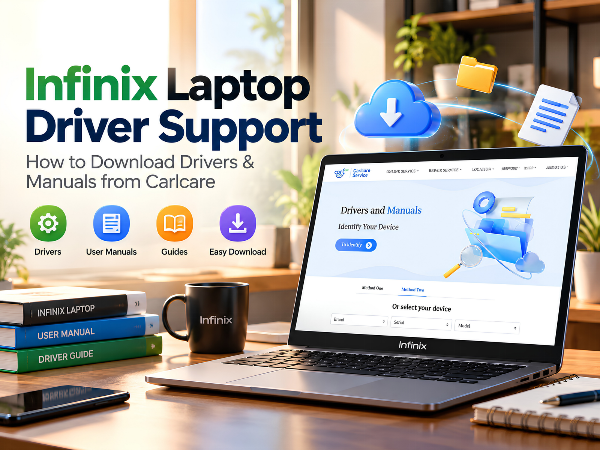
If you're looking for Infinix laptop drivers, driver updates or product manuals, Carlcare provides an official online resource where you can identify your device and check the available downloads.
In this guide, we'll explain how to use the Carlcare driver support page, when you may need to download drivers, and what to do if a driver is missing or isn't working correctly.
Where to Download Infinix Laptop Drivers
You can access the official Carlcare Drivers and Manuals page here:
Download Infinix Laptop Drivers and Manuals
The page allows you to identify your device by entering its serial number (SNID) or by selecting the available device options. Once your device is identified, you can check the resources available for your model.
Using the official support page helps you look for model-specific driver files instead of downloading software from unknown third-party websites.
Why Are Laptop Drivers Important?
Drivers are software components that allow your operating system to communicate with your laptop's hardware. If a driver is missing, outdated or incompatible, certain features may not work as expected.
Here are some common situations in which you may need to check your Infinix laptop drivers.
1. Wi-Fi or Bluetooth Is Not Working
If your laptop cannot detect wireless networks or connect to Bluetooth devices, a missing or incompatible network driver may be one possible cause.
Checking the appropriate driver for your laptop model can help you troubleshoot the issue.
2. Audio or Speaker Problems
If your laptop's speakers, microphone or audio output are not functioning properly, the audio driver may need attention. However, hardware faults and incorrect sound settings can also cause similar problems.
3. Touchpad or Keyboard Issues
A touchpad that behaves unexpectedly or certain keyboard functions that stop working may sometimes be related to drivers or system settings.
Before installing anything, check whether the problem is caused by disabled settings, Windows updates or a hardware issue.
4. Display or Graphics Issues
Display resolution problems, missing graphics options or unusual screen behaviour can sometimes be associated with an incompatible graphics driver.
Always select a driver intended for your exact laptop model and supported operating system.
5. After Reinstalling Windows
If you've reinstalled Windows on your Infinix laptop, some hardware components may not function correctly until the appropriate drivers are installed.
This is one of the situations in which the Carlcare Drivers and Manuals page can be particularly useful.
How to Download Infinix Laptop Drivers from Carlcare
Follow these steps to find the resources available for your laptop.
Step 1: Open the official website
Visit the Carlcare Drivers and Manuals page.
Step 2: Identify your laptop
The page provides two ways to identify your device:
- Enter your device serial number (SNID).
- Select your device using the available selection fields.
Step 3: Check the available resources
After identifying your device, review the drivers and manuals displayed for that model.
Availability may vary depending on the device and the resources provided on the support page.
Step 4: Download the appropriate file
If the required driver is listed, download the file intended for your exact model and follow the installation instructions provided with it.
Step 5: Restart and test your laptop
If the installation instructions recommend restarting the computer, do so. Then check whether the affected feature is working correctly.
If the problem continues, it may require additional troubleshooting.
What Is a Laptop Serial Number or SNID?
A serial number or SNID is a device-identification number that helps identify a particular laptop model or unit.
When using Carlcare's driver support page, entering the requested identification information can help you locate the appropriate resources.
Make sure you enter the information accurately. If you're unsure where to find it, check the laptop's product label, packaging or documentation.
What Should You Do If a Driver Is Not Available?
If you cannot find the required driver on the support page, avoid downloading files from unverified websites. An incorrect driver can cause compatibility issues or introduce security risks.
Instead, try the following:
- Confirm that you've identified the correct laptop model.
- Check whether the driver is available through Windows Update.
- Review the device manufacturer's documentation for supported installation methods.
- Contact Carlcare support if you need assistance locating the correct resource.
For specialised components, such as a touchpad, graphics control utility or performance-management software, the correct package may depend on the exact laptop configuration.
Tips Before Installing Laptop Drivers
Before updating or installing drivers, keep these precautions in mind:
- Verify the model: Ensure the driver matches your exact laptop.
- Check compatibility: Confirm that the driver supports your Windows version.
- Use trusted sources: Prefer official support pages and Windows Update.
- Back up important data: Keep a backup before making major system changes.
- Avoid unnecessary updates: Don't install drivers intended for different hardware simply because the names appear similar.
- Follow installation instructions: Some driver packages require a restart or a particular installation sequence.
If your laptop has a serious hardware issue, installing drivers alone may not resolve it.
Frequently Asked Questions
Where can I download Infinix laptop drivers?
You can visit the official Carlcare Drivers and Manuals page and identify your device using its SNID or the available selection fields.
Can I download drivers after reinstalling Windows?
Yes, you can check the Carlcare support page for drivers available for your identified model. The availability of specific files depends on the device and support resources provided.
What if my Infinix laptop's Wi-Fi or touchpad stops working?
First, check Windows settings, Device Manager and Windows Update. If the problem appears driver-related, look for the correct model-specific driver through official support resources.
Is it safe to download drivers from third-party websites?
Downloading drivers from unknown sources can expose your laptop to incompatible software or security risks. Prefer official sources and verify that the driver matches your device.
What if I cannot find my laptop model on the Carlcare website?
Recheck the device identification information. If your model or the required driver still does not appear, contact Carlcare support for guidance.
Get Help with Infinix Laptop Driver Issues
Keeping your laptop drivers compatible and up to date can help maintain the proper functioning of its hardware. Whether you've reinstalled Windows, are troubleshooting connectivity issues or need a specific driver, start by identifying your device through Carlcare's official support page.
Find your laptop's available drivers and manuals here:
Carlcare Infinix Laptop Driver Support
If you need further assistance, you can also contact Carlcare India.
- Toll-Free: 1800-4190-525
- WhatsApp: +91 99991 35666
- Email: service.india@carlcare.com
Driver availability depends on the identified device and supported resources. Always verify compatibility before installing a driver.