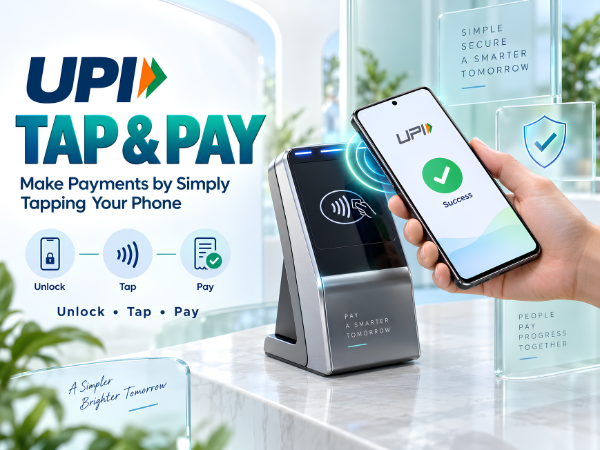
Scanning a QR code has become second nature in India. Whether you're paying at a grocery store, café, pharmacy or local shop, you probably open your UPI app, scan the merchant's QR code, enter the amount and complete the payment.
But UPI payments can now be even more convenient with UPI Tap & Pay.
With this feature, users with a compatible NFC-enabled smartphone can tap their phone on a supported UPI Smart QR or NFC tag to capture the merchant's payment information instead of scanning the QR code with the camera. NPCI describes UPI Tap & Pay as another way to initiate UPI payments alongside familiar methods such as Scan & Pay. (NPCI)
Here's how UPI Tap & Pay works, which phones support it, how UPI LITE works with Tap & Pay, and what you should know before using it.
What Is UPI Tap & Pay?
UPI Tap & Pay is an NFC-based UPI payment feature.
NFC stands for Near Field Communication, a short-range wireless technology that allows compatible devices to communicate when they are brought very close together.
Instead of pointing your smartphone camera at a QR code, Tap & Pay allows a supported UPI app to capture the merchant's UPI ID or VPA when you tap your NFC-enabled phone against a compatible UPI Smart QR or UPI Smart NFC Tag. (NPCI)
In simple terms:
Traditional UPI: Open app → Scan QR → Pay
UPI Tap & Pay: Open app → Choose Tap & Pay → Tap phone → Pay
What Do You Need to Use UPI Tap & Pay?
Not every smartphone or merchant setup will support this feature.
According to NPCI, you need:
An NFC-enabled smartphone or compatible device
A UPI app that supports Tap & Pay
A merchant with a compatible UPI Smart QR or UPI Smart NFC Tag
NPCI specifically states that access to UPI Tap & Pay requires a mobile/device with NFC capability. (NPCI)
So, if you don't see the Tap & Pay option in your UPI app, it doesn't necessarily mean something is wrong with your phone. Support depends on both the device and the UPI application.
How to Check If Your Android Phone Has NFC
On many Android smartphones, you can check NFC by opening:
Settings → Connected Devices / Connections / More Connections → NFC
The exact menu name varies depending on your phone brand and Android version.
You can also open Settings and search for:
NFC
If an NFC setting appears, check whether it is enabled.
Some smartphones, particularly affordable models, may not include NFC hardware. A software update cannot add NFC to a phone that doesn't have the required hardware.
How to Use UPI Tap & Pay
NPCI outlines a straightforward Tap & Pay process. (NPCI)
Step 1: Open Your Supported UPI App
Open the UPI application on your NFC-enabled smartphone.
Step 2: Select Tap & Pay
Look for the Tap & Pay option inside the app.
Its exact location and interface may differ between UPI apps.
Step 3: Enter the Amount
Enter the amount you need to pay.
Always verify the amount carefully before proceeding.
Step 4: Tap Your Phone
Bring the NFC area of your smartphone close to the merchant's compatible UPI Smart QR or NFC tag.
Your phone uses NFC to obtain the merchant's payment information.
Step 5: Complete the Payment
Review the merchant and transaction details displayed on your phone and complete the payment using the authentication method applicable to that transaction.
Wait for confirmation before leaving the merchant.
Does UPI Tap & Pay Work Without Scanning a QR Code?
Yes. That's one of its main advantages.
UPI Tap & Pay uses NFC to capture the merchant's UPI information, so you don't have to use your phone's camera to scan the QR code. (NPCI)
However, the merchant must have a compatible NFC-enabled UPI Smart QR or Smart Tag. Tapping your phone against an ordinary printed QR code without NFC capability will not magically initiate a Tap & Pay transaction.
How Does UPI LITE Work with Tap & Pay?
UPI Tap & Pay can also work with UPI LITE.
NPCI currently describes UPI LITE as a solution for low-value transactions below ₹1,000 that can be processed in a faster, PIN-less manner. (NPCI)
For Tap & Pay specifically, NPCI's product page states that for amounts up to ₹500, UPI LITE takes the lead when it is enabled. Otherwise, the transaction can be made through the linked bank account with the applicable UPI PIN. For amounts above ₹500, the regular online transaction requires a UPI PIN. (NPCI)
This distinction is important because the general UPI LITE transaction limit and the specific Tap & Pay flow described by NPCI are not identical.
UPI Tap & Pay vs Scan & Pay
Both ultimately provide ways to make UPI payments, but the way the merchant's information is captured differs.
|
Feature |
UPI Scan & Pay |
UPI Tap & Pay |
|
Technology |
Camera + QR |
NFC |
|
What you do |
Scan merchant QR |
Tap compatible Smart QR/NFC tag |
|
NFC required |
No |
Yes |
|
Camera required |
Yes for QR scanning |
No for tapping |
|
Compatible merchant setup required |
UPI QR |
NFC-enabled UPI Smart QR/Tag |
|
Payment network |
UPI |
UPI |
Tap & Pay doesn't replace Scan & Pay. It simply gives users another convenient way to initiate a UPI transaction.
Is UPI Tap & Pay the Same as Contactless Debit or Credit Card Payment?
No.
Both may use NFC, and the physical action of tapping can look similar, but they are different payment methods.
With a contactless card, the transaction uses the applicable card-payment infrastructure.
With UPI Tap & Pay, the payment is initiated through the UPI ecosystem using a supported UPI application and compatible merchant NFC setup. (NPCI)
So, seeing the word "Tap & Pay" doesn't automatically mean a debit or credit card is involved.
Which UPI Apps Support Tap & Pay?
App support can change over time, so users should check their UPI application's current features.
NPCI's UPI Tap & Pay product page currently lists several live implementations, including BHIM and selected bank/payment applications, while availability may be limited for some users or versions. (NPCI)
The simplest check is to update your UPI app to its latest version and look for a Tap & Pay option.
NPCI UPI Tap & Pay official information
Is UPI Tap & Pay Safe?
UPI Tap & Pay changes how the payment details are captured; it doesn't mean you should stop checking transaction information.
Before approving any UPI payment:
- Check the merchant name.
- Verify the amount.
- Never share your UPI PIN with anyone.
- Don't enter a UPI PIN merely to receive money.
- Keep your phone protected with a PIN, password, fingerprint or other screen lock.
- Avoid handing an unlocked phone to unknown people.
- Check the successful transaction confirmation before leaving.
NPCI states that users should never share their UPI PIN and that bank customer support will not ask for it. (NPCI)
What If Tap & Pay Is Not Working on Your Phone?
If you have the feature but tapping isn't working, check a few things first.
Make sure your smartphone actually supports NFC and that NFC is switched on.
Update your UPI application and check whether Tap & Pay is supported for your app/account.
Try holding the phone closer to the NFC area of the merchant's Smart QR or tag. The NFC antenna position differs between smartphone models, so the exact part of the phone you need to bring close to the tag may vary.
Also confirm that the merchant's QR/tag supports NFC-based UPI Tap & Pay. An ordinary QR code can still be used through Scan & Pay, but it won't necessarily support tapping.
Why UPI Tap & Pay Can Be Useful
Tap & Pay removes one small step from the familiar UPI experience: lining up your camera with a QR code.
That can make everyday payments feel quicker and more natural, particularly at busy counters.
It can be useful for:
Grocery stores
Cafés and restaurants
Pharmacies
Retail shops
Quick everyday purchases
Other merchants equipped with compatible UPI NFC acceptance
The important point is that both your smartphone/app and the merchant's payment setup need to support the feature.
UPI Tap & Pay Brings a New Way to Use UPI
India already uses UPI for everything from small local purchases to online shopping. UPI Tap & Pay adds NFC as another way to initiate those payments.
Instead of:
Open → Scan → Align QR → Pay
you can use a compatible setup to:
Open → Tap → Pay
It isn't available on every phone or at every merchant yet, but for users with an NFC-enabled device and a supported UPI app, it can make everyday payments more convenient.
Having NFC or Software Issues on Your Smartphone?
If NFC is supported on your TECNO, Infinix or itel smartphone but isn't functioning correctly, or you're experiencing another software or hardware issue, Carlcare provides official after-sales support in India.
📞 Carlcare Toll-Free: 1800-4190-525
📍 Find a Carlcare Service Center
UPI Tap & Pay availability depends on the smartphone's NFC capability, supported UPI app, bank/account eligibility and compatible merchant acceptance infrastructure. Features and transaction limits may change; check your UPI app and NPCI's latest information before use.