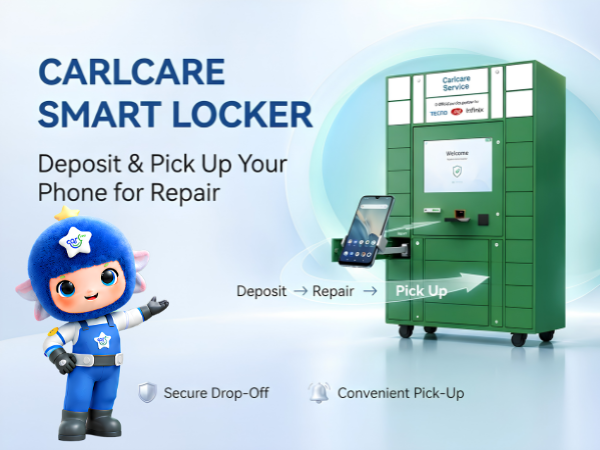
Getting your smartphone repaired can now be more convenient with the Carlcare Smart Locker. Designed to simplify the phone repair process, the Smart Locker allows customers to securely deposit their device for repair and collect it after the service is completed.
If you use a TECNO, Infinix or itel smartphone and a Carlcare Smart Locker is available at your selected location, you can follow the on-screen instructions to submit your phone without going through the regular device handover process.
Here is a complete guide to the Carlcare Smart Locker device deposit and pickup procedure.
What Is Carlcare Smart Locker?
Carlcare Smart Locker is a self-service facility designed to make smartphone repair drop-off and collection easier.
Customers can enter their details on the Smart Locker screen, select their device and repair information, place the phone inside the assigned compartment and complete the deposit process.
A Carlcare staff member then collects the device from the Smart Locker for repair.
Once the repair is completed, the customer receives a pickup code via SMS and can return to the Smart Locker to retrieve the repaired phone.
How to Deposit Your Phone in Carlcare Smart Locker
The device deposit procedure is simple. Follow these steps carefully to ensure a smooth and secure deposit.
Step 1: Select "Deposit for Repair"
On the Carlcare Smart Locker screen, tap:
"Deposit for Repair"
This will begin the device submission process.
Step 2: Enter Your Phone Number and Device Details
Enter your active and reachable phone number.
Make sure you provide the correct number because it may be used for communication regarding your repair.
Next:
- Select your phone model.
- Choose the appropriate locker compartment size.
- Select the fault type.
- Tap "Repair Service Agreement."
Read the repair service agreement carefully before proceeding.
Step 3: Place Your Phone in the Assigned Locker
The Smart Locker will assign a compartment for your device.
Place your phone securely inside the assigned locker and close the door properly.
Then tap:
"Confirm Door Close."
Make sure the device is safely inside before confirming.
Step 4: Keep the Printed Repair Information
Once your phone has been successfully deposited, the Smart Locker will print your repair information.
Take the printed copy with you and keep it safe.
It contains information related to your device submission and repair.
Step 5: Carlcare Staff Collects Your Device
Once the deposit process is complete, a staff member will collect your smartphone from the Smart Locker.
Your device can then proceed through the applicable repair process.
What Happens After Your Phone Is Repaired?
Once your repair is completed, you will receive a 6-digit pickup code via SMS.
Keep this code secure because you will need it when collecting your smartphone from the Smart Locker.
How to Pick Up Your Repaired Phone from Carlcare Smart Locker
Once you have received the pickup code, return to the Smart Locker and follow these steps.
Step 1: Select "Retrieve After Repair"
On the Smart Locker screen, tap:
"Retrieve After Repair."
You will then be asked to provide your pickup information.
Step 2: Enter Your 6-Digit Pickup Code
Enter the 6-digit pickup code you received via SMS.
Once you've entered the correct code, tap:
"Enter"
to proceed.
Step 3: Collect Your Smartphone
If no payment is required, the appropriate locker will open automatically.
Collect your repaired smartphone and make sure you have taken the correct device before leaving.
What If You Don't Receive the Pickup Code?
If your device has been repaired but you haven't received a pickup code, don't repeatedly attempt to collect the device without the required information.
You can contact Carlcare for assistance.
📞 Carlcare Toll-Free: 1800-4190-525
You can also contact Carlcare through its official Facebook page for assistance.
Important Things to Check Before Depositing Your Phone
Before placing your smartphone inside the Carlcare Smart Locker, take a few minutes to prepare your device.
Keep Your Phone Number Active
Enter a phone number that is active and reachable. This is particularly important because your repair and pickup information may be communicated through this number.
Select the Correct Phone Model
Make sure the model selected on the Smart Locker matches the device you're depositing.
Incorrect device information can create unnecessary complications during the repair process.
Select the Correct Compartment Size
Choose a locker compartment appropriate for your phone's dimensions.
Don't force a smartphone into a compartment that is too small.
Select the Correct Fault Type
Choose the option that most accurately describes the problem with your phone.
For example, your device may have:
- Display or touchscreen problems
- Charging issues
- Battery problems
- Camera issues
- Speaker or microphone problems
- Software problems
- Other hardware-related issues
Providing accurate fault information can help the service team understand the problem.
Read the Repair Service Agreement
Before proceeding with the deposit, carefully read the Repair Service Agreement displayed during the process.
Make sure you understand the applicable repair and service conditions before confirming.
Keep Your Printed Repair Information
Don't leave the printed information at the Smart Locker.
Once the deposit is successful, take the printed copy with you and keep it until your repair and pickup process is completed.
Prepare Your Smartphone Before Repair
Before submitting any smartphone for repair, it's also a good practice to:
Back up important data: Save important photos, videos, contacts, documents and other personal information.
Remove your SIM card: Unless required for troubleshooting, remove your SIM before depositing the phone.
Remove your memory card: If your phone has a microSD card, remove it unless specifically required for the service.
Check Finance Lock: If your device has an active finance or EMI-related lock that may restrict diagnosis or repair, check the applicable requirements before submission.
Remember your device information: Keep important device and repair details available in case the service team needs clarification.
Why Use Carlcare Smart Locker?
The Carlcare Smart Locker is designed to make the phone repair journey more convenient.
Convenient Device Drop-Off
Follow the guided steps on the screen and securely deposit your smartphone in the assigned locker.
Secure Locker Compartment
Your phone is placed inside an assigned compartment until it is collected by the service staff.
Simple Repair Collection
Once your device is ready, you receive a pickup code and can use it to retrieve the repaired phone.
Easy-to-Follow Digital Process
The on-screen instructions guide you through device selection, fault information, locker assignment, deposit and pickup.
Carlcare Smart Locker for TECNO, Infinix and itel Users
Carlcare is the official after-sales service provider for TECNO, Infinix and itel devices. The Smart Locker adds another convenient service option for eligible customers at locations where the facility is available.
Whether you need help with a damaged display, battery issue, charging problem, software fault or another eligible smartphone repair, you can check the available Carlcare service options in your area.
Need Help with Carlcare Smart Locker or Phone Repair?
If you need assistance while depositing or collecting your smartphone, or have questions about your repair, contact Carlcare.
📞 Contact Us: 1800-4190-525
📍 Find a Service Center:
https://www.carlcare.in/in/service-center/
📅 Book a Repair Appointment:
https://www.carlcare.in/in/repair-appointment/
Carlcare Smart Locker availability and applicable repair services may vary by service centre and location. Follow the instructions displayed on the Smart Locker at the time of use. T&C Apply.